 CEU Tracker.org
Getting Started with CEU Tracker: Understanding Licenses and Professions
After signing up for CEU Tracker, your first step is to add your license. This step is required before you can start logging CEUs, as each CEU must be linked to a license and one of its renewal periods.
When adding a license, you’ll first be asked to select your profession. We've received a few questions about this step, so we’d like to clarify what “profession” means, how it differs from your license title, and why it's important.
Think of profession as a broader category of licensure, while your license title is the specific designation issued by your state or board.
For example:
The profession setting becomes important when you hold multiple licenses.
When you add a CEU, CEU Tracker automatically applies that credit to all licenses within the same profession, as long as the course completion date aligns with each license’s renewal period. This saves you from entering the same CEU multiple times for each license.
If you only have one license, the profession you select won’t have much impact. But if you have two or more licenses, choosing the correct profession ensures your CEUs are distributed accurately and efficiently.
For example, I currently have three licenses on my dashboard:
Now, let's say I also earned a credential as an Alcoholism and Substance Abuse Counselor (CASAC). Since CASAC falls under a different profession with its own CEU requirements, I would select Alcohol and Substance Counselor profession when adding that license.
At this point, I would have two professions in my account:
When you have multiple professions, CEU Tracker won't automatically assume where a CEU should apply. Instead, you will be given the option to choose one or more professions when adding each CEU.
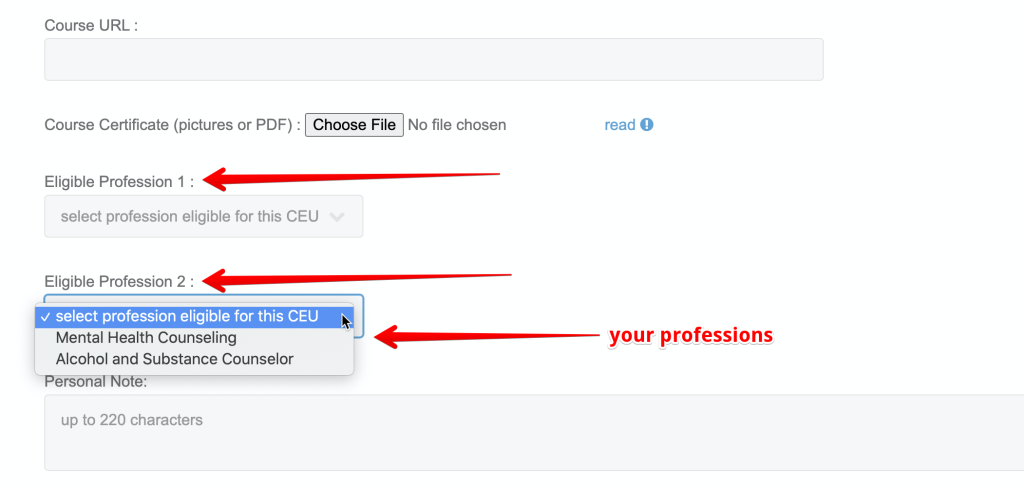
This option gives you the flexibility to:
Do take a moment to carefully choose your professions if you hold more than one license. Group together only the licenses that share similar CEU requirements - this helps your tracking stay clean and efficient.
Don't assign the same profession to all your licenses without thinking how your CEUs actually apply. Some members select "Other" for everything, but that can make tracking less accurate and limit your flexibility down the road.
When in doubt, ask yourself this simple question:
"Will all my CEUs apply to all my licenses?"
If the answer is no, it's best to separate those licenses into different professions. That way, each CEU is applied exactly where it belongs, keeping your records accurate, organized, and fully compliant.
By organizing licenses by profession, CEU Tracker streamlines your workflow, reduces duplicate data entry, and ensures your continuing education credits are accurately tracked across all your credentials. Please note that each CEU can currently be applied to up to three different professions.
If you have any questions or suggestions, feel free to leave a comment below so everyone can benefit from the discussion. Hopefully, this article helped clear up a few things and made the process a bit easier to understand!
After signing up for CEU Tracker, your first step is to add your license. This step is required before you can start logging CEUs, as each CEU must be linked to a license and one of its renewal periods.
When adding a license, you’ll first be asked to select your profession. We've received a few questions about this step, so we’d like to clarify what “profession” means, how it differs from your license title, and why it's important.
Profession vs. License Title
Think of profession as a broader category of licensure, while your license title is the specific designation issued by your state or board.
For example:
- Licensed Professional Counselor (LPC)
- Licensed Mental Health Counselor (LMHC)
- Licensed Clinical Professional Counselor (LCPC)
- Licensed Professional Clinical Counselor (LPCC)
- Licensed Clinical Mental Health Counselor (LCMHC)
Why Profession Matters
The profession setting becomes important when you hold multiple licenses.
When you add a CEU, CEU Tracker automatically applies that credit to all licenses within the same profession, as long as the course completion date aligns with each license’s renewal period. This saves you from entering the same CEU multiple times for each license.
If you only have one license, the profession you select won’t have much impact. But if you have two or more licenses, choosing the correct profession ensures your CEUs are distributed accurately and efficiently.
A Real-World Example
For example, I currently have three licenses on my dashboard:
- Licensed Mental Health Counselor (NY)
- Licensed Professional Counselor (NJ)
- National Board Certified Counselor (National)
Now, let's say I also earned a credential as an Alcoholism and Substance Abuse Counselor (CASAC). Since CASAC falls under a different profession with its own CEU requirements, I would select Alcohol and Substance Counselor profession when adding that license.
At this point, I would have two professions in my account:
- Mental Health Counseling - 3 licenses
- Alcohol and Substance Counseling - 1 license
If You Have More Than One Profession
When you have multiple professions, CEU Tracker won't automatically assume where a CEU should apply. Instead, you will be given the option to choose one or more professions when adding each CEU.
This option gives you the flexibility to:
- Apply a CEU only to your CASAC license
- Apply it only to your Mental Health Counseling licenses
- Or apply it to all licenses, when appropriate
Do's and Don'ts
Do take a moment to carefully choose your professions if you hold more than one license. Group together only the licenses that share similar CEU requirements - this helps your tracking stay clean and efficient.
Don't assign the same profession to all your licenses without thinking how your CEUs actually apply. Some members select "Other" for everything, but that can make tracking less accurate and limit your flexibility down the road.
When in doubt, ask yourself this simple question:
"Will all my CEUs apply to all my licenses?"
If the answer is no, it's best to separate those licenses into different professions. That way, each CEU is applied exactly where it belongs, keeping your records accurate, organized, and fully compliant.
The Bottom Line
By organizing licenses by profession, CEU Tracker streamlines your workflow, reduces duplicate data entry, and ensures your continuing education credits are accurately tracked across all your credentials. Please note that each CEU can currently be applied to up to three different professions.
If you have any questions or suggestions, feel free to leave a comment below so everyone can benefit from the discussion. Hopefully, this article helped clear up a few things and made the process a bit easier to understand!
Printable CEU Summary and Inventory Reports
We’re excited to announce that we’re in the final stage of testing a new feature that lets you print or save a full inventory of your CEUs - giving you quick, professional summaries to keep for your records or share with others.
Placeholder
Interesting content will appear here in the future.
Emoticons are a great way to visually express how you feel.
However, there are times when unintended content is converted to emoticon because the content happens to have one of the emoticon symbols. That's why it's always good idea to preview your comment before posting and
when you see this type of problem, you can indicate NOT to auto convert.